Documentation
Install
Download macOS 1.0.5 (.dmg), drag ResourcesBar to /Applications, and open it.
Requires macOS 13+. Windows and Linux are not supported.
Using the menu
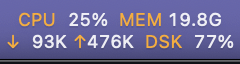
- Click the menu bar item for CPU user/system, memory and swap, network rates, every mounted disk, and disk I/O.
- Choose which metrics appear in the menu bar.
- Menu Bar Disk picks which disk the bar shows.
- Change the update interval (default 2s).
- Condensed Menu Bar uses smaller two-row text; the setting persists.
- Enable Launch at Login (works best from
/Applications).
Build from source
Needs the Xcode Command Line Tools (xcode-select --install).
./build.sh           # build/ResourcesBar.app
./build.sh install   # also copy to /Applications
sh test.sh           # tests
Releases
Pushing a v* tag runs the release workflow, which signs, notarizes and publishes the disk image. See the README for required secrets.